You can delete your account only if there are no active loans linked to it.
To submit an account deletion request:
- Open the LenDenClub application.
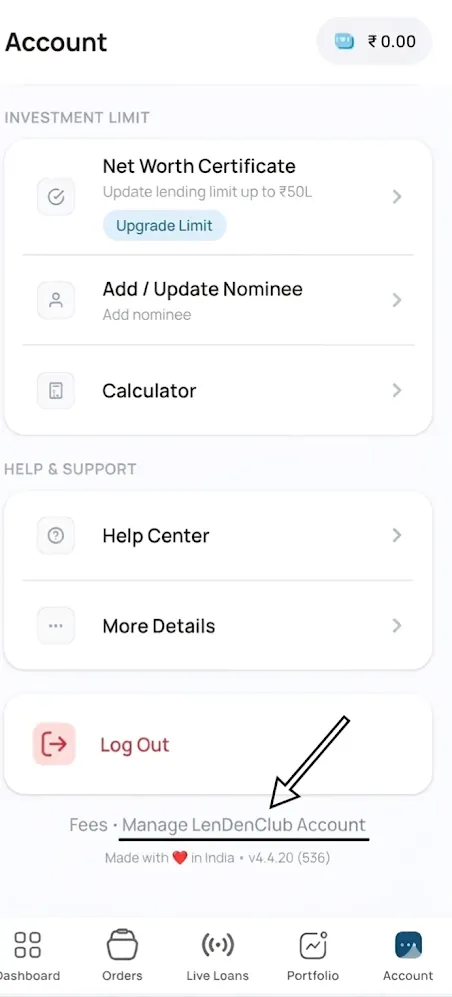
- Go to the Account tab (bottom-right corner).
- Scroll to the bottom of the page.
- Click on Manage LenDenClub Account (as shown in the screenshot) and proceed with the account deletion request.
Please Note:
- If you have any outstanding principal amount from your investments or any active loans linked to your account, you will not be able to deactivate or delete your account until all loans are fully closed or settled.
- Cooling-off Period: Once your account deletion request is submitted, a 30-day cooling-off period will begin. If you log in to your account at any time during this period, the deletion request will be cancelled automatically, and your account will be reactivated. If no login is detected during the 30-day period, your account will be permanently deleted.
- Data Retention: As per our regulatory and internal policy requirements, your KYC and transaction-related records cannot be deleted immediately. These records will be securely retained for 5 years from the date of account closure, after which they will be handled in accordance with the applicable data retention policy.